# WhatsApp Filters
**Introduce**
WhatsApp filters support custom generated number segments and local import of mobile numbers.Scan the code to log in to multiple WhatsApp accounts, filter whether the number is registered with WhatsApp, filter the WhatsApp avatar (determine gender and age according to the avatar), and personal signature.Exporting data is also supported. The software is easy to operate, easy to use, and supports free download and use.
Notic:Software download or use may be accidentally killed by anti-virus software, please do not prevent the software from running, just add the software to the white list.
Tip: When using the software, please set the local VPN to \[Global Proxy] mode
WhatsApp Filters Software download address:
**Navigation**
{% content-ref url="/pages/N3KgJxFV3AeX3KgVLG28" %}
[Preparations before use](/whatsapp-filters/preparations-before-use)
{% endcontent-ref %}
{% content-ref url="/pages/jdGU1f55Qt0ZwPFckc14" %}
[Number Generation Method](/whatsapp-filters/number-generation-method)
{% endcontent-ref %}
{% content-ref url="/pages/mGqDbWnoaCZ2pGQH7Pz0" %}
[How to ues Whatsapp Filters](/whatsapp-filters/how-to-ues-whatsapp-filters)
{% endcontent-ref %}
{% content-ref url="/pages/PUykrBO4NNL2ZdvLsKvx" %}
[Query and export by condition](/whatsapp-filters/query-and-export-by-condition)
{% endcontent-ref %}
{% content-ref url="/pages/vMbBYEOJSBRICrQnZfbo" %}
[Search mobile numbers by criteria](/whatsapp-filters/search-mobile-numbers-by-criteria)
{% endcontent-ref %}
{% content-ref url="/pages/IGXp1Y0xzfRsIFmSyFmF" %}
[Filter avatar](/whatsapp-filters/filter-avatar)
{% endcontent-ref %}
# Preparations before use
Pass download and install software.
After downloading and decompressing the software, install it. Click "Startup Program" to run the software:arrow\_down:
Notic:Software download or use may be accidentally killed by anti-virus software, please do not prevent the software from running, just add the software to the white list.
# Number Generation Method
# Custom generated phone number
**Custom generation:** The number segment can be edited freely, and the last digits of the number are generated according to the country code/area code, order or random. Generate a specified number of numbers.
**Filter Duplicates:** Check this option, the process of generating or importing numbers will filter out duplicate number.
According to your needs, you can set it by yourself, select \[Sequential] to generate or \[Random] to generate.
For example: the country code you fill in is 1, the number is 4044550000, and the last 4 digits are generated sequentially, then the generated numbers are 4044550000,4044550001,4044550002,4044550003,4044550004\
\
If random is selected, the number segment is randomly generate.
**Generate:** Click \[Generate], the number is automatically generated and saved in the software:arrow\_down:
# Global Number Generation Reference
Global number generation reference: the software supports the selection of country, city, and area code segment, and generates the specified total number randomly or sequentially:arrow\_down:
# Import Phone Numbers
Import mobile numbers: import mobile numbers locally. (need to use a file format ending in .txt)
# How to ues Whatsapp Filters
**Log into your WhatsApp account:**
1.Scan the QR code to log in to your WhatsApp account for filtering:\
(1) You need to scan the QR code to log into your active WhatsApp account and use your WhatsApp account permissions to filter numbers.\
(2) Scan the code to log in to multiple WhatsApp accounts, which can effectively circumvent WhatsApp restrictions.
2.Import the WhatsApp channel number for filtering:\
(1) Import your WhatsApp channel number and use its permissions to filter numbers.\
(2) Importing multiple WhatsApp channel numbers can effectively avoid WhatsApp restrictions.
Note:Proxy IP settings must be set before channel numbers can be used to screen numbers
**Number of accounts used at the same time:**\
(1) When some customers use the number of accounts at the same time and select "All", the WhatsApp account that scans the code to log in is likely to be restricted, or the software may freeze or crash.In the above cases, the number of simultaneous account openings can be changed to the specified numbe.\
(2) If the specified number is 3, then the software will operate 3 accounts at the same time for screening, and automatically replace the next account for screening when there is a limit on one account, and cycle operatio.
**Get avatar:** In the process of filtering numbers, the software will automatically download the avatar of the WhatsApp account. Support to identify gender and age based on avata.
**Personalized signature:** In the process of filtering numbers, the software will automatically download the about of the WhatsApp account and support the language for identifying the about.
**Filtering speed:** For example, if the filtering speed is set to 10, then the WhatsApp account logged in on the left will filter 10 numbers each time; the larger the filter speed value, the faster the filter speed; if the value is set too large, if the corresponding slowness occurs, or the software is stuck, the value can be reduced.
**Filter interval (milliseconds):** For example, if the filter interval is set to 100 milliseconds, it means that you need to wait 100 milliseconds after filtering one number, and continue to filter the next number. The smaller the value, the faster the filtering speed. If there are filtering restrictions, you can increase this value appropriately.
**Waiting to download avatars:** In the case of checking Waiting for avatars to download, the software will download WhatsApp avatars during the filtering process (the download of avatars will be slow due to problems such as network speed). If Waiting for Avatar Download is checked, the software will wait for all avatars to be downloaded before proceeding with the filtering task.
Step 1: Scan the QR code to log in to multiple WhatsApp accounts:arrow\_down:
Import multiple channel numbers:arrow\_down:
Example of the picture below: When the specified number is selected, the software will automatically cycle through the WhatsApp account to filter the number:arrow\_down:
Step 2: Set filtering rules and perform filtering tasks:arrow\_down:
# Query and export by condition
After the task of filtering numbers, query the numbers according to the conditions (check whether to register a WhatsApp account, whether there is an avatar, gender, age range, and personalized signature language), and finally export the current list number (supports four export formats):arrow\_down:
# Search mobile numbers by criteria
After the number filtering task is completed, according to the conditions (whether to register a WhatsApp account, whether to have an avatar, gender, age range, about language, whether to register a FaceBook account, whether to register an Instagram account, whether to register a Telegram account).
Find phone numbers by criteria:arrow\_down:
# Filter avatar
**Filter avatar**:The software can import pictures and identify the gender and age information of the avatar according to the pictures.
# Various Account Filters
**Introduction**
Various account filters, support for custom generation of number segments, local import of mobile phone numbers, and support for filtering whether to register Whatsapp, Facebook, Instagram, and Telegram accounts.Support Telegram group member extraction.
Scan the code to log in to multiple WhatsApp accounts, filter whether the number is registered on WhatsApp, filter the Whatsapp avatar (determine gender and age according to the avatar), and personalize the signature. Support filtering Telegram number active time (last online time) and exporting data. The software is easy to operate, easy to use, and supports free download and use.
Notic:Software download or use may be accidentally killed by anti-virus software, please do not prevent the software from running, just add the software to the white list.
Tip: When using the software, please set the local VPN to \[Global Proxy] mode
Various Account Filters Software download address:
**Navigation**
{% content-ref url="/pages/L4akbDeQQEsTibZ2BbWA" %}
[Preparations before use](/various-account-filters/preparations-before-use)
{% endcontent-ref %}
{% content-ref url="/pages/wvuQ9ZRZV3PA6wsgWHcB" %}
[Number Generation Method](/various-account-filters/number-generation-method)
{% endcontent-ref %}
{% content-ref url="/pages/UEKF2d0xbMTYE7I49wZM" %}
[How to use Various Account Filters](/various-account-filters/how-to-use-various-account-filters)
{% endcontent-ref %}
{% content-ref url="/pages/aAK5WrdaqyhxDTa002Ig" %}
[Search mobile numbers by criteria](/various-account-filters/search-mobile-numbers-by-criteria)
{% endcontent-ref %}
{% content-ref url="/pages/7ULGmhTBaOEJSh7iaMZK" %}
[Export Mobile Number](/various-account-filters/export-mobile-number)
{% endcontent-ref %}
{% content-ref url="/pages/pjVuIwQ3WYvWOAE8iGXq" %}
[Telegram group member extraction](/various-account-filters/telegram-group-member-extraction)
{% endcontent-ref %}
# Preparations before use
Pass download and install software.
After downloading and decompressing the software, install it. Click "Startup Program" to run the software:arrow\_down:
Notic:Software download or use may be accidentally killed by anti-virus software, please do not prevent the software from running, just add the software to the white list.
# Number Generation Method
Click to navigate:arrow\_right:[**Custom generation:**](/various-account-filters/number-generation-method/custom-generation)You can freely edit the number segment, and generate a specified number of numbers in the order of the country code or randomly
Click to navigate:arrow\_right:[**Global number generation reference:**](/various-account-filters/number-generation-method/global-number-generation-reference) Support selection of country, city, area code number segment, and generate the specified total number randomly or sequentially
Click to navigate:arrow\_right:[**Import mobile numbers:** ](/various-account-filters/number-generation-method/import-mobile-numbers)Import mobile numbers locally (requires a file format ending in .txt)
# Custom Generation
**Custom generation:** The number segment can be edited freely, and the last digits of the number are generated according to the country code/area code, order or random. Generate a specified number of numbers.
**Filter Duplicates:** Check this option, the process of generating or importing numbers will filter out duplicate number.
According to your needs, you can set it by yourself, select \[Sequential] to generate or \[Random] to generate.
For example: the country code you fill in is 852, the number is 54320000, and the last 4 digits are generated sequentially, then the generated numbers are 85254320000, 8254320001, 85254320002, 85254320003, 85254320004.\
For example: the country code you fill in is 852, the number is 54320600, and the last 4 digits are generated sequentially, then the generated numbers are 85254320600, 85254320601, 85254320602, 85254320603 .\
If random is selected, the number segment is randomly generate.
**Generate:** Click \[Generate], the number is automatically generated and saved in the software:arrow\_down:
# Global Number Generation Reference
Global number generation reference: the software supports selecting country, city, area code number segments, generating the specified total number randomly or sequentially, and querying and exporting data after filtering is completed:arrow\_down:
# Import Mobile Numbers
Import mobile numbers: import mobile numbers locally (need to use a file format ending in .txt), filter accounts to use:arrow\_down:
# How to use Various Account Filters
# Filter WhatsApp
**Log into your WhatsApp account:**
1.Scan the QR code to log in to your WhatsApp account for filtering:\
(1) You need to scan the QR code to log into your active WhatsApp account and use your WhatsApp account permissions to filter numbers.\
(2) Scan the code to log in to multiple WhatsApp accounts, which can effectively circumvent WhatsApp restrictions.
2.Import the WhatsApp channel number for filtering:\
(1) Import your WhatsApp channel number and use its permissions to filter numbers.\
(2) Importing multiple WhatsApp channel numbers can effectively avoid WhatsApp restrictions.
Note:Proxy IP settings must be set before channel numbers can be used to screen numbers
**Number of accounts used at the same time:**\
(1) When some customers use the number of accounts at the same time and select "All", the WhatsApp account that scans the code to log in is likely to be restricted, or the software may freeze or crash.In the above cases, the number of simultaneous account openings can be changed to the specified numbe.\
(2) If the specified number is 3, then the software will operate 3 accounts at the same time for screening, and automatically replace the next account for screening when there is a limit on one account, and cycle operatio.
**Get avatar:** In the process of filtering numbers, the software will automatically download the avatar of the WhatsApp account. Support to identify gender and age based on avata.
**Personalized signature:** In the process of filtering numbers, the software will automatically download the about of the WhatsApp account and support the language for identifying the about.
**Filtering speed:** For example, if the filtering speed is set to 10, then the WhatsApp account logged in on the left will filter 10 numbers each time; the larger the filter speed value, the faster the filter speed; if the value is set too large, if the corresponding slowness occurs, or the software is stuck, the value can be reduced.
**Filter interval (milliseconds):** For example, if the filter interval is set to 100 milliseconds, it means that you need to wait 100 milliseconds after filtering one number, and continue to filter the next number. The smaller the value, the faster the filtering speed. If there are filtering restrictions, you can increase this value appropriately.
**Waiting to download avatars:** In the case of checking Waiting for avatars to download, the software will download WhatsApp avatars during the filtering process (the download of avatars will be slow due to problems such as network speed). If Waiting for Avatar Download is checked, the software will wait for all avatars to be downloaded before proceeding with the filtering task.
Step 1: Scan QR code to log in to multiple WhatsApp accounts:arrow\_down:
Import multiple channel numbers:arrow\_down:
Example of the picture below: When the specified number is selected, the software will automatically cycle through the WhatsApp account to filter the number:arrow\_down:
Step 2: Set the rules for filtering numbers and perform the task of filtering numbers
# Filter FaceBook
**Set up proxy:**
It is necessary to set the proxy IP of the Dove-ip platform, and filter accounts through different IPs of the Dove-IP platform to avoid filtering restrictions:arrow\_down:
# Filter Instagram
**Set up proxy:**
(1) Direct mode: Filter numbers using local computer network permissions.
(2) Proxy mode: It is necessary to set the proxy IP of the Dove-ip platform, and filter accounts through different IPs of the Dove-IP platform to avoid filtering restrictions.
Set the rules for filtering numbers and perform the task of filtering numbers:arrow\_down:
# Filter Telegram
**Log in to your Telegram account:**
(1) Manually enter the Telegram account or import the session account as needed, and use the Telegram account permissions to filter the numbers.
(2) Logging in to multiple Telegram accounts can effectively circumvent Telegram restrictions
**Set up proxy:**
Configure proxy IPs in different countries according to the Telegram account to reduce the ban rate.
Step 1: Login to your Telegram account
Method 1: Manually enter an account to log in to Telegram:arrow\_down:
Method 2: Import the session number:arrow\_down:
Step 2: Set the rules for filtering numbers and perform the task of filtering numbers:arrow\_down:
# Use Dove-ip, Register and Recharge
When filtering FaceBook, filtering Instagram, and filtering Telegram, proxy IPs from different countries will be configured according to the account to reduce the ban rate. The software is connected to the Dove-ip platform, the following are the registration and recharge methods.
Click \[Register Account] to enter the quick registration. After successful registration, you need to \[Enter Platform Recharge] to recharge and use it:arrow\_down:
# Search mobile numbers by criteria
After the number filtering task is completed, according to the conditions (whether to register a WhatsApp account, whether to have an avatar, gender, age range, about language, whether to register a FaceBook account, whether to register an Instagram account, whether to register a Telegram account).
Find phone numbers by criteria:arrow\_down:
# Export Mobile Number
**Export current list phone numbers:**
Supported export file formats: .txt.vcf.xls.xlsx four formats.
Export current list phone numbers:arrow\_down:
# Telegram group member extraction
**Import group file:** import the group link address, using a file in .txt format (group link address is separated by carriage return).
**IP connection method:** use the direct connection mode, and use the IP of your local VPN to extract data. If you extract too much data, it will be restricted by Telegram. After being restricted, you need to manually switch the IP to continue the task.Use proxy mode. After using the proxy mode, the IP will be changed automatically to avoid extraction restrictions.
**Filtering:** Supports filtering based on the input country code, filtering out mobile phone numbers, etc.
**Export:** Support exporting mobile phone number and user name.
# Facebook marketing software
**Introduce**
Facebook marketing software that supports batch import of FaceBook account IDs or emails, cookies, and configuration of different country proxy IPs. It can login to multiple FaceBook accounts and support generating fingerprint environment for each window based on IP and region to reduce the risk of being blocked and facilitate management.
The software can simulate user browsing of friend's pages on FaceBook, view friend's activities, increase FaceBook account weight, and reduce the risk of being blocked. It can also collect groups based on entered keywords, export group links, add groups, and post in bulk.
For fan marketing, it can collect members who have joined groups, members of unfamiliar groups, and page fans. It can add friends in bulk, send private messages, like and comment on personal homepage posts, specify the recommended person from a certain country, set the gender and number of recommended persons added for each account, and send private messages, likes and comments to friends in bulk. It can also confirm friend requests in bulk.
For posting, it can post on personal and public pages.
The software also includes a customer service chat management function, which uses common phrases for quick replies and automatically translates chat records.
Notic:Software download or use may be accidentally killed by anti-virus software, please do not prevent the software from running, just add the software to the white list.
**Navigation**
{% content-ref url="/pages/dKWpG3V716G1LgoWj1Wp" %}
[Preparations before use](/facebook-marketing-software/preparations-before-use)
{% endcontent-ref %}
{% content-ref url="/pages/JLPdn6x9lSLFbZMLgoRg" %}
[Broken mention](broken://pages/JLPdn6x9lSLFbZMLgoRg)
{% endcontent-ref %}
{% content-ref url="/pages/fZs7XZfflhDN2xhZ49re" %}
[Account](/facebook-marketing-software/account)
{% endcontent-ref %}
{% content-ref url="/pages/WKmCe2lojR4Zw3PvD91f" %}
[Nurturing](/facebook-marketing-software/nurturing)
{% endcontent-ref %}
{% content-ref url="/pages/dmeB6Senrx6xrdhi8zLY" %}
[Groups](/facebook-marketing-software/groups)
{% endcontent-ref %}
{% content-ref url="/pages/XYeVMfMBzSMBH1BZbxnv" %}
[Member](/facebook-marketing-software/member)
{% endcontent-ref %}
{% content-ref url="/pages/sz0VAHY2gbZoFyjgB815" %}
[Homepage](/facebook-marketing-software/homepage)
{% endcontent-ref %}
{% content-ref url="/pages/fr4cYaFftpvIWIuSiDJt" %}
[Live](/facebook-marketing-software/live)
{% endcontent-ref %}
{% content-ref url="/pages/5ToayxNk4rSKYmLp0O0w" %}
[Information](/facebook-marketing-software/information)
{% endcontent-ref %}
{% content-ref url="/pages/1tfIGFiLuK4A3YR99xjJ" %}
[Messager](/facebook-marketing-software/messager)
{% endcontent-ref %}
{% content-ref url="/pages/vX46Q9sEXixnA59oN4S1" %}
[Settings](/facebook-marketing-software/settings)
{% endcontent-ref %}
{% content-ref url="/pages/mrOx4SzsOrk6SNYasa6m" %}
[Usage Tips](/facebook-marketing-software/usage-tips)
{% endcontent-ref %}
# How to check computer configuration to determine the number of simultaneous logins for fb accounts
**CPU Requirements:** The number of simulta8ous running windows = CPU logical processor count \* 2 (For the configuration shown below, with 8 logical processors, it is recommended to simultaneously log in to 8 \* 2 = 16 Facebook accounts for tasks). Note: The actual number of accounts you can log in to may exceed the CPU logical processor count \* 2, but it may result in lagging or performance issues depending on your computer configuration.
Open Task Manager -> Performance -> CPU
**Memory Requirements:** Each window requires 300MB of memory.
# Preparations before use
Pass [ ](https://www.crownsoft007.com/html/facebookmarketing.html)download and install software.
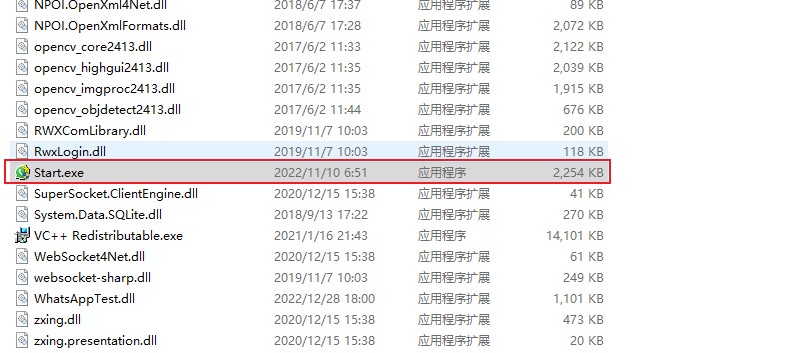
After downloading and decompressing the software, install it. Click "Startup Program" to run the software.
Notic:Software download or use may be accidentally killed by anti-virus software, please do not prevent the software from running, just add the software to the white list.
# Account
Log in to a new FaceBook account for easy management of your logged in FaceBook account.
{% content-ref url="/pages/1A201HbyagNd88u1w9mU" %}
[New Login](/facebook-marketing-software/account/new-login)
{% endcontent-ref %}
{% content-ref url="/pages/66zIfwtwBMCx5QL5F5Jm" %}
[New Batch Login](/facebook-marketing-software/account/new-batch-login)
{% endcontent-ref %}
{% content-ref url="/pages/apFuqcAueKGlqCrSVY6v" %}
[Export Cookie](/facebook-marketing-software/account/export-cookie)
{% endcontent-ref %}
# New Login
The software supports logging in with accounts or cookies, and different country proxy IPs can be configured during login. When logging in with FaceBook accounts, the official FaceBook system checks the location of each login IP. Therefore, corresponding country proxy IPs can be purchased based on account needs to reduce the probability of account blocking.
**Method 1: Log in with account.**:arrow\_down:
Steps to use this method: Click on 'New Login' > Select ' Log with Account' > Configure IP by selecting 'Local' > Click on 'Start' > Enter FaceBook account and password in the pop-up window and click on 'Log in'.
**Method 2: Log in with cookie.**:arrow\_down:
Steps to use this method: Click on 'New Login' > Select 'Log with cookie' and copy-paste the cookies information into the software > In the 'IP configuration' dropdown menu, select 'Local' or ' Http/Socks5' depending on the account's requirements for the corresponding country IP > Click on 'Start.
# New Batch Login
Batch login for new accounts, supports bulk importing of account IDs and Cookies, configuring different country proxy IPs, and executing automatic login tasks.
Note: If the number of new accounts for batch login exceeds the sub-account control limit, please contact customer service or agents to purchase and increase the control limit according to your needs.
**Method 1: Batch import accounts (currently supports .txt format files), optional web version domain name and mobile version domain name.**
1.Login domain: [http://www.facebook.com](http://www.facebook.com/) (based on the web version), login using account ID or email.
2.Login domain: (based on the mobile version), login using account ID or email.
Usage Steps: First, click on 'New Batch Login' > Select 'Import Accounts from txt format files' > Click 'Import' to import Facebook accounts from the local files into the software, check the accounts you want to log in > Select 'Login Domain: Web Version or Mobile Version', select 'Login Method: Account ID or Email' > Click 'New Batch Login'.
Login domain: [http://www.facebook.com](http://www.facebook.com/) (based on the web version), software login using account ID and email. Login process::arrow\_down:
Login domain: (based on the mobile version), software login using account ID or email. Login process::arrow\_down:
**Method 2: Batch import Cookies (.xls/xlsx format), use Http/Socks5 proxy IP , the logged-in accounts will be assigned the selected IP in order.**:arrow\_down:
Usage steps: Click on "New Batch Login" > Select "Import Cookies from xls format files" > Click "Import" to import the cookies from the local files into the software, check the accounts you want to log in > Select "Login Domain: Web Version or Mobile Version", select "Login Method: Email or Account ID" > Click "IP Configuration", here you can purchase proxy IPs of the corresponding country according to the location requirements of the purchased FaceBook accounts, select "Use Local VPN Direct Connection, Use Http/Socks5 Proxy IP" > Click "Start Login Task".
# Export Cookie
**Export selected account cookies:** Batch export cookies to local files.
Usage steps: Check the FaceBook accounts whose cookie information needs to be exported > Click "Export Cookies" > The Facebook accounts will be exported to the local files.
# Nurturing
**Nurturing:**The software simulates manual ooperation of this account to increse the weight of this account,Reduce account suspension rate.
**Nurturing rule:**The new accounts will randomly click on the page,while the aged accounts will browse the homepages of their friends and check their updates.
**Nurturing Duration:**When it is set to 0,the nurtures is completed and the task is automatically ended.When it not 0,it is the longest nurtures time.After the time is up,the nurtures will be terminated automatically.
**Usage steps:** Check the FaceBook accounts to be nurtured on the left side > Enter the number of minutes for nurturing > Click "Start".
# Groups
**Introduce:**Collect Facebook groups by keyword, add groups, post in groups, and support exporting group links.
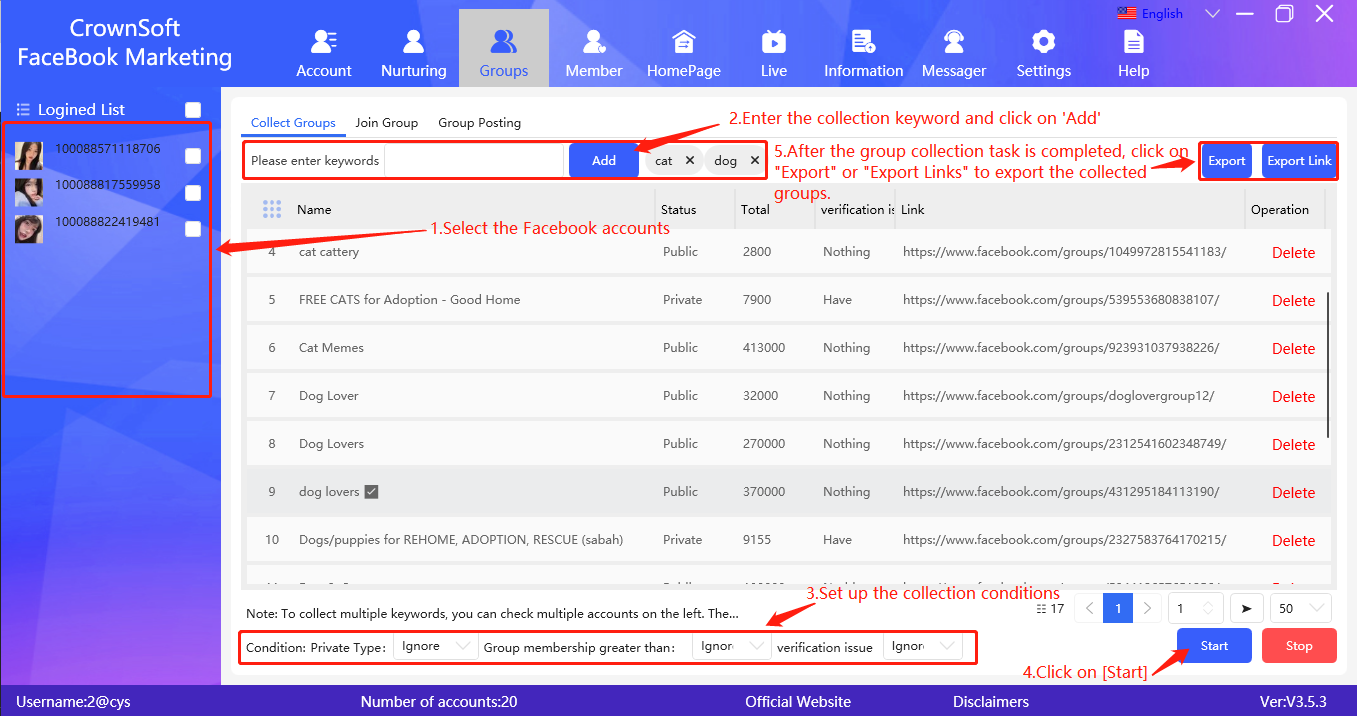
**Collecting Groups:** Enter different keywords, and the selected Facebook accounts will execute group collection tasks based on the input keywords and configured collection conditions. After completing the collection task, the software supports exporting group links to the local or adding them to the group.
**Collection conditions:** Collect groups that meet the user's set group type, member count, and verification questions.
**Export:** After the group collection task is completed, export it to add to the group or export it to collect unknown group members.
**Exporting Links:** After the group collection task is completed, export links in batches to the local.
**Usage steps:** select the logged-in Facebook accounts in the software, enter the keywords you want to collect in the software, and click "Add". Then set the "Collection Condition" in the lower-left corner of the software, including setting the private type of the group, the number of members, and the verification questions. Finally, click "Start " to begin the collection process.
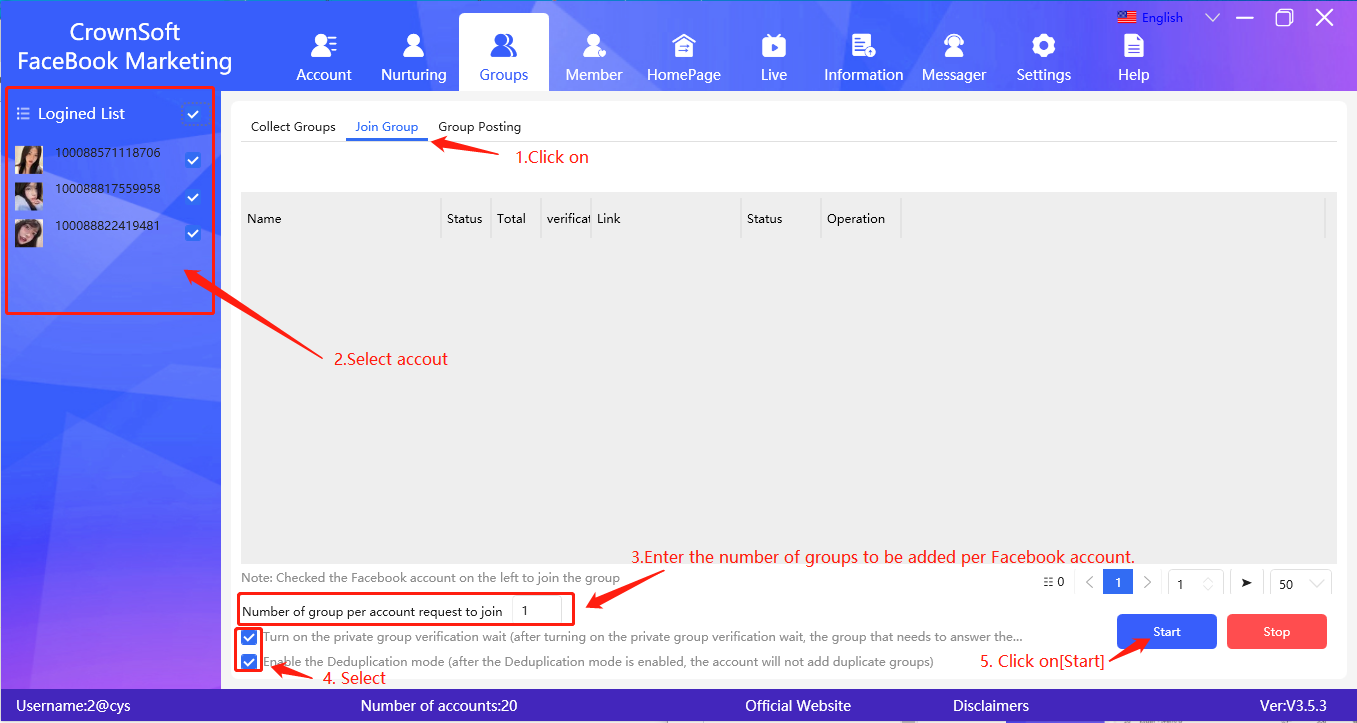
**Adding groups:** Selected Facebook accounts will apply to join groups based on configured conditions (each Facebook account can join up to 6000 groups). When encountering private group verification waiting (manually answering group questions), the deduplication mode is enabled so that the same account will not join duplicate groups.
Number of groups to add per account: Set the number of groups to be added per account.
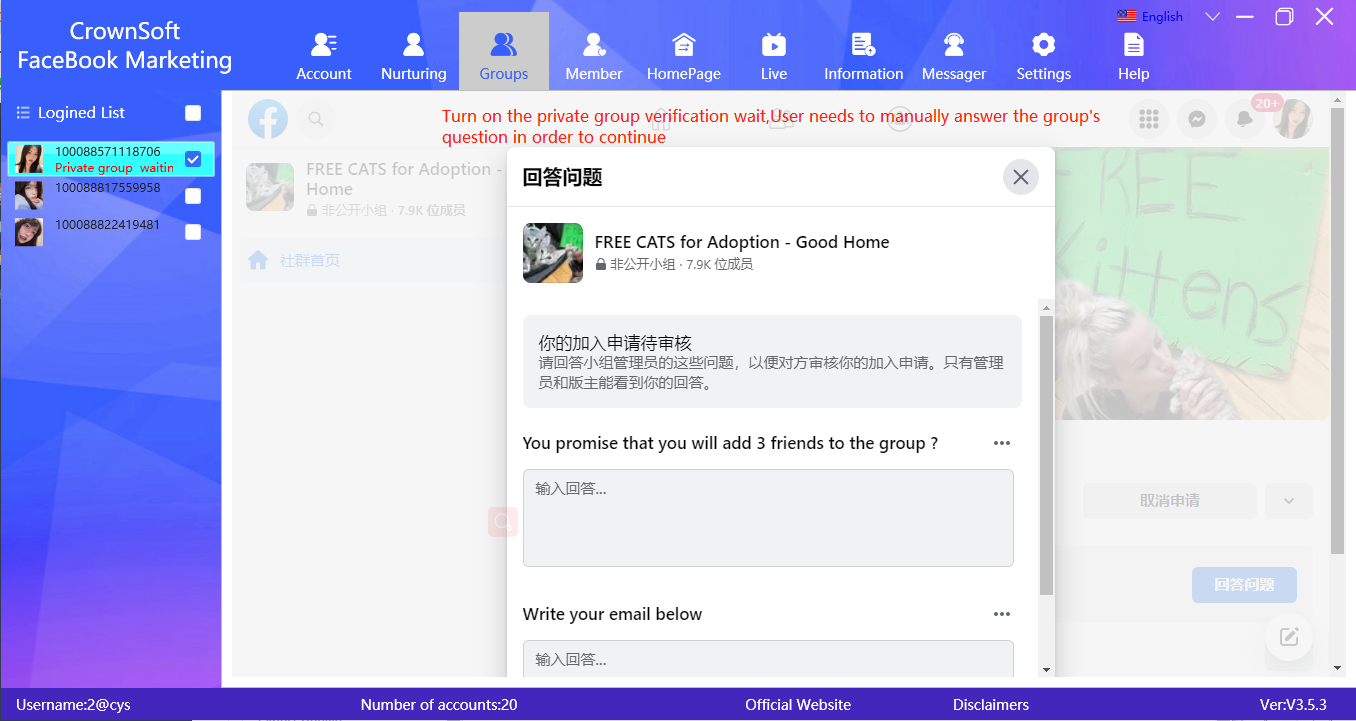
Enable private group verification waiting: Groups that require question answering will not be skipped, and will wait for the user to manually answer the questions set for that group before continuing to execute.
Enable deduplication mode: After enabling deduplication mode, the Facebook account list will not add the same group twice.
**Usage steps:**Select the Facebook accounts to add groups to > Set the number of groups to be added for each Facebook account in "Number of groups to apply for each account" > Check "Turn on the private group verification waiting" and "Enable deduplication mode" if desired > Click "Start Task".
Turn on the private group verification wait,User needs to manually answer the group's question in order to continue.:arrow\_down:
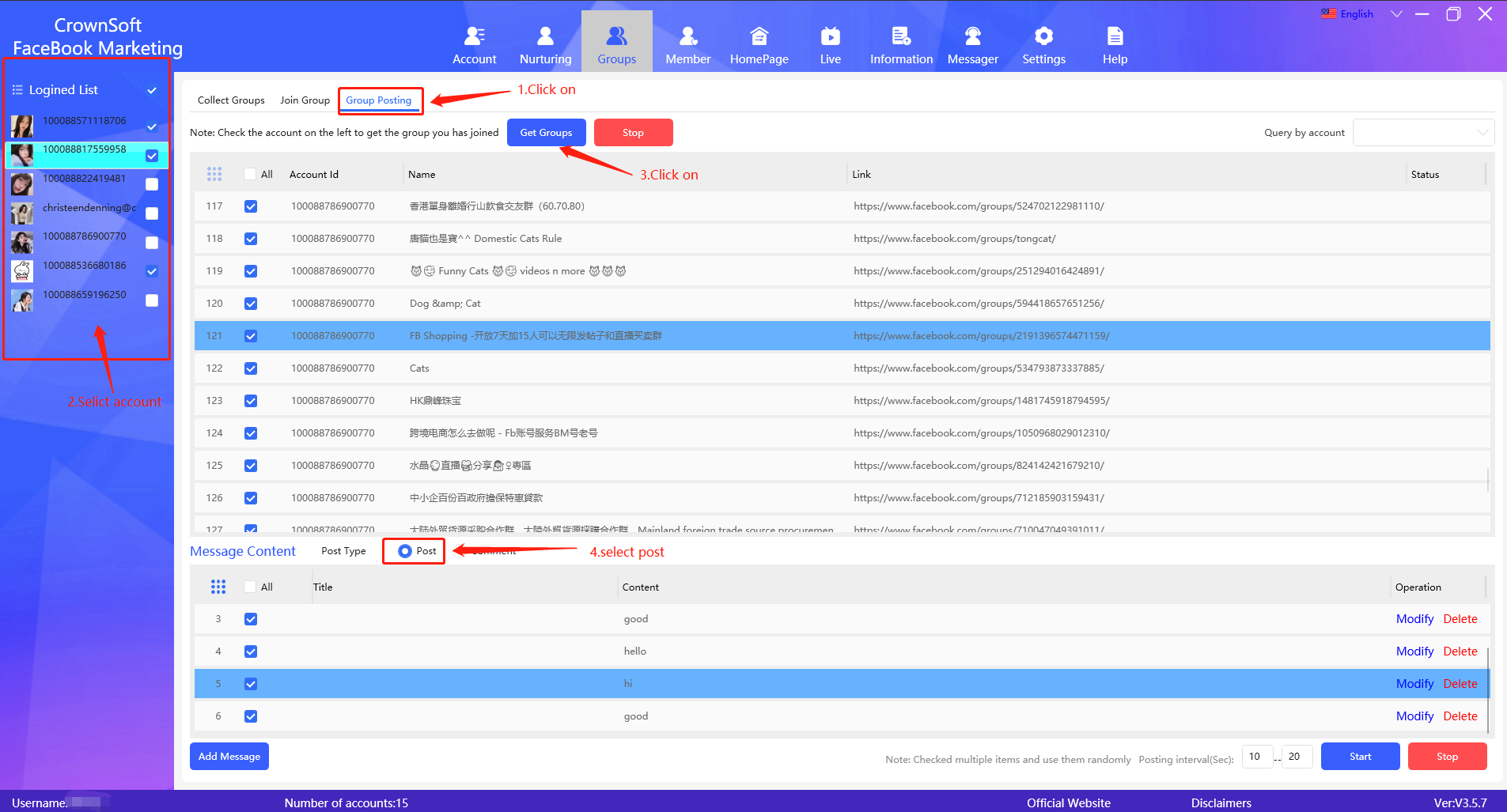
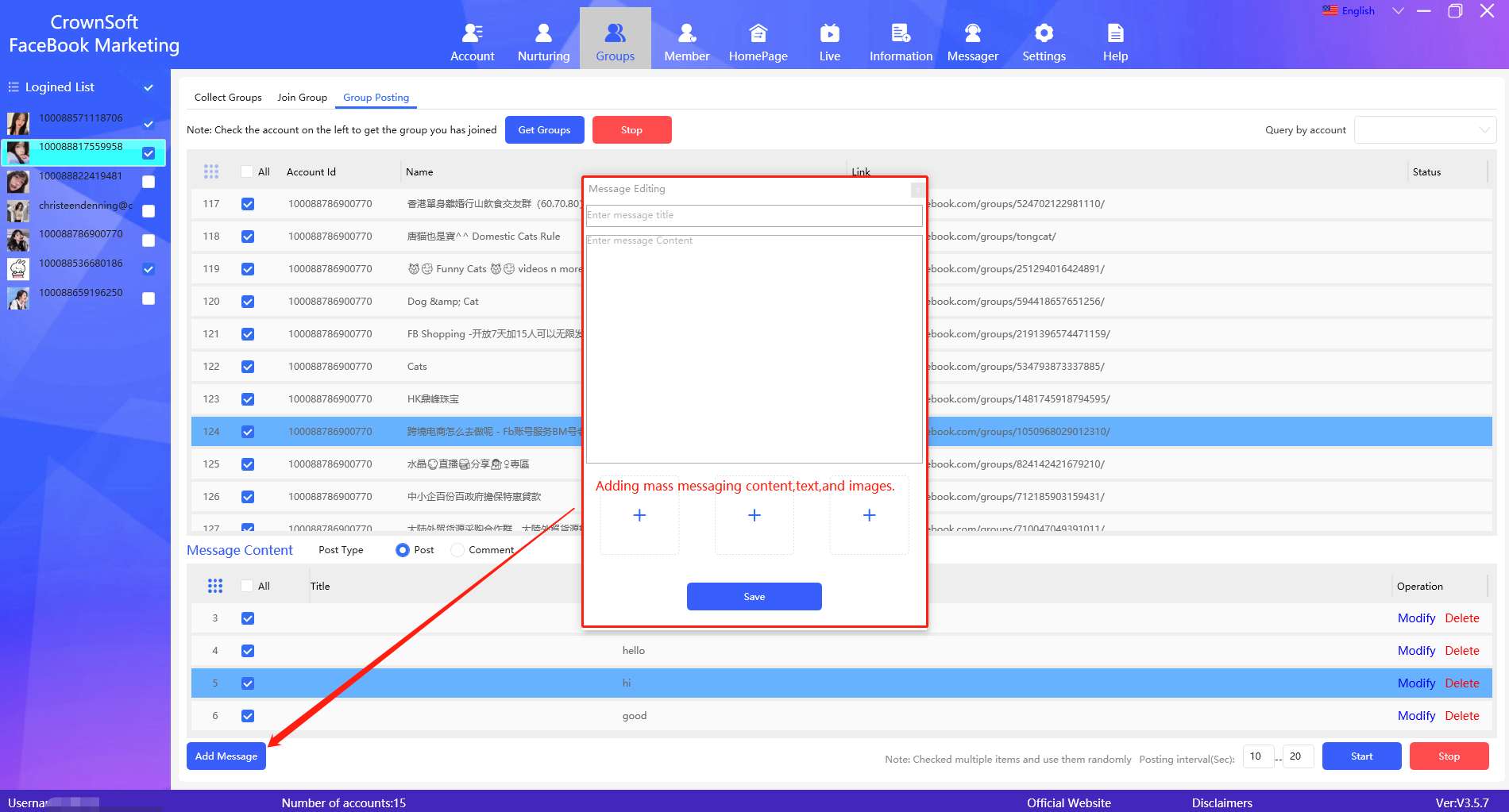
**Group posting:** Get the Facebook account of the group that has joined, and after adding group posting content, specify the FaceBook account to post in the group you have joined (when multiple group posting content is selected, it will be used randomly) Get Groups: Get the groups that the selected Facebook account has joined Query by account: Query the groups that each account has joined, and check the group that posted the message Post Type: Post Add mass content: edit title, text, picture, (when multiple mass content is selected, the software will use it randomly) Steps to use: Check the Facebook account you want to post > click "Get Group", the software will get all the group addresses joined by the Facebook account into the software > check the group address > choose the type of post: post > click "Add group content" , enter the content and picture in the post template, and click Save, check the group content > click "Start Task".
**Group Posting:** The software collects the joined groups of the logged-in Facebook account, adds group posting content, and specifies the Facebook account to post in the joined groups (when multiple posts are selected, they are randomly used). Get groups: Get the joined groups of the selected Facebook accounts. Search by account: Search the joined groups of each account and select the groups for posting. Add posting content: Edit the title, text, and image (when multiple posts are selected, the software will randomly use them).
**Usage steps:**Select the Facebook accounts to post in > Click "Get Groups" and the software will retrieve all the group links that the Facebook accounts have joined > Select the group links > Click "Add Message" and enter the content and image in the post template, then click "Save" > Check the post contents to be used > Click "Start".
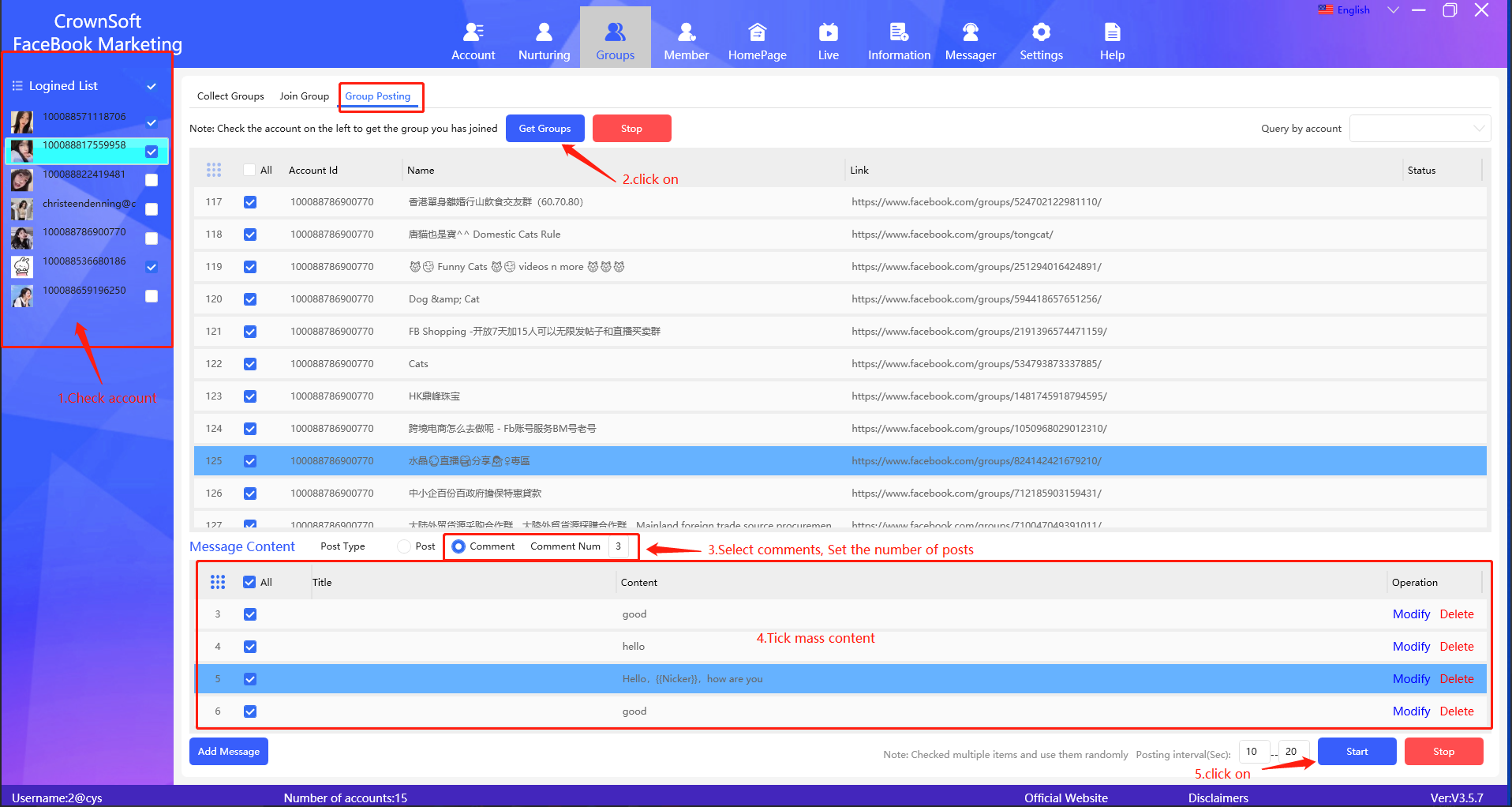
**Group comment posting:** Get the Facebook account's joined groups, add group comment content, and specify the Facebook account to post comments in joined groups (randomly using when multiple group comments are selected). Get groups: Get the joined groups of the selected Facebook accounts. Search by account: Search for joined groups for each account and select the groups for posting. Posting type: Comment posting, set the number of comments to post (up to 3 comments per group at a time). Add group comment content: Edit the title, text, and images. (When multiple group comment content is selected, the software will randomly use them.) Steps: Select the Facebook account(s) for posting, click "Get groups", and the software will retrieve all group addresses that the Facebook account has joined. Select the group addresses, choose the posting type as "Comment posting", click "Add group comment content", enter the content and image in the post template, save and select the group comment content, and then click "Start Task".
# Member
# Collection Users
**Collect Group Members:** Collect all members joined in the Facebook account's groups, and collect members that meet the conditions set in the software.
**Collect Unknown Group Members:** Enter the link address of the unknown group, and collect the members that meet the conditions set in the software (some groups have privacy settings and may not be able to collect members in non-public groups. You can choose to collect members in public groups).
**Collect Homepage Fans:** Collect all friends and fans of the page, set collection conditions, and during the collection process, the software will query the gender and location of the friends or fans of the page.
Note: The country condition for collection currently only supports English and Chinese, and some date formats are not supported for join time.
Collect Group Members:arrow\_down:
**Usage steps**: Select the logged-in Facebook account, click "Get Groups". The software will retrieve all group addresses of the logged-in account and add them to the software. After the task of getting groups is complete, select the group addresses to collect members from, set the collection conditions, and click "Start".
**Collect Unknown Group Members**:arrow\_down:
**Usage steps:** Check the logged-in Facebook account, enter the group address of the unfamiliar group members to be collected, click "Add" to add it to the software, or export it to "collect unfamiliar groups" from the group marketing. Check the group address, set the collection conditions, and click "Start”.
**Collect Homepage Fans**:arrow\_down:
**Usage steps:** Enter the address of the personal page to be collected and click "Add" to add the address to the software> Check the personal page address> Check the logged-in Facebook account> Select the type of page members to be collected, "Collect all friends" or "Collect fans"> Set collection conditions> Click "Start"> After the collection task is completed, click "Export results" to local or click "Export to new user marketing list".
# User Marketing
**Number of messages to send per account:** Enter the number of messages to be sent per Facebook account
**Add friends:** The selected accounts perform the task of adding friends. If they encounter users who have already been added, they will not be added again and will be skipped. (According to Facebook's official rules, you can send up to 1000 friend requests waiting for approval. If you send more friend requests than this, the previous requests will be deleted. Each Facebook account can add up to 5000 friends.)Note: If the Facebook account has disabled the add friend feature, it will not be able to send friend requests to others.
**Liking personal page:** liking the latest post on the user's personal page.Note: If the Facebook account has disabled the like function, it will not be possible to send a like to the user's post.
**Personal page comment:** Leave a comment on the latest post of the user's personal page. (If group posting is prone to account suspension, then you can use the personal page like and comment functions.)Note: If the Facebook account has disabled commenting, it will not be able to send comments to others.
**Mass message:** Selected accounts execute the mass message task. (After sending a message to a user, you can see whether the other party has viewed the message. For example: when your message has been sent, delivered, and read by the other party, FaceBook will use different icons to display it.)
**Delete private message sending record:** When using cookies to log in to a Facebook account to send private messages, if you do not want to leave a record of sending private messages, you can delete the sending record, but the recipient can still receive the private message.
User Marketing:arrow\_down:
# Add Referees
**Add Referrer:** Batch operate the selected Facebook accounts and specify adding a referrer from a certain country, setting the number of referrers to be added for each account.
**De-duplication mode:** The software will not add the same referrer to any account in the Facebook account list. If you select Duplicate Removal Mode, the software will operate all Facebook accounts to obtain the 100 most recently added friends and the 100 most recently sent friend requests and save these records to the database before adding the referrer to avoid duplication with the data in the database.
**Referrer Gender:** If you select a certain gender, the software will first visit the referrer's homepage before adding the referrer, check the referrer's gender, and will not add if it does not meet the condition.
**Referrer Country:** If you select a certain country, the software will first visit the referrer's homepage before adding the referrer, check the referrer's country, and will not add if it does not meet the condition. If you want to add referrers from a specified country, please first add Facebook accounts with many friends in the specified country as friends. Facebook will associate your account with that country and prioritize recommending people from that country to you.
Number of recommended friends to add per account: Set the number of recommended friends to be added in bulk (Note: if there are no recommended friends in a single account, the account will not continue to execute the task).
Interval between adding recommended friends in seconds: Set the specified interval in seconds for adding recommended friends.
Add Referees:arrow\_down:
**Steps to use:** Check the Facebook accounts on the left with recommended friends > Select 'De-duplication mode' > Set preferences for recommended friend gender and country/region > Set the number of recommended friends to add per account and the interval time between adding friends > Click 'Start'.
# Friend marketing
**Send messages to selected friends:** First select the Facebook accounts on the left, get their friends list, select the friends you want to send messages to, and execute tasks such as liking and commenting on their latest posts, and sending private messages to them.
**Like personal page:** Like the latest post on the user's personal page.
**Comment on personal page:** Post a comment on the latest post on the user's personal page. (If sending private messages in bulk is likely to result in account suspension, you can use the personal page like/comment function instead.)
**Send private messages in bulk:** Send private messages to the selected friends. (After sending a message to a friend, you can see if they have viewed the message. For example, different icons are used to indicate when your message has been sent, delivered, and read by the recipient.)
**Delete sent messages history:** When using a FaceBook account logged in with cookies to send messages, if you do not want to keep the sent messages history, you can delete it. However, the recipient can still receive the messages.
Send messages to selected friends:arrow\_down:
**Delete checked friends:** Unfriend the selected friends.
# Confirm Request
**Confirm all friend requests:** The account will confirm all received friend requests. If confirmation criteria are set (gender and country), the account will check the personal page of the friend request sender for matches. If the criteria are not met, the friend request will not be confirmed. **Number of friend requests to confirm:** Set the number of friend requests to confirm. The account will confirm friend requests based on the configured number.
Note: Facebook's official rules state that each Facebook account can have a maximum of 5000 friends. If the number of friends exceeds this amount, the friend requests cannot be confirmed.
Confirm all friend requests:arrow\_down:
# Homepage
**Make a post on personal Facebook profile:** Create a post on the selected Facebook profile's personal page.
Note: Facebook page posts do not support having both video and image in the same post.
Make a post on personal Facebook profile:arrow\_down:
# Live
# Collect live
Login multiple Facebook accounts, enter keywords, and use multiple Facebook accounts to collect live room addresses related to the keywords.
The steps are as follows:\
First, log in to multiple Facebook accounts> then enter the keywords and click "Add"> check the logged-in Facebook accounts on the left> click "Start"> when the collection task is completed> click "Export Links" to local or click "Export to Live Marketing".
# Collect live users
Add or import multiple live stream addresses to the software and collect the IDs, nicknames, and page addresses of live stream users.
**Follow these steps:** First, log in to a Facebook account> Add live stream addresses or import live stream addresses from the local drive> Select the Facebook account on the left> Check the live stream addresses to be collected> Click 'Start'> When the collection task is completed> Click 'Export Results' to the local drive or click 'Export to New User Marketing List'.
# Live interaction
**Live interaction:** You can increase the popularity of a specified live stream by using multiple Facebook accounts to follow, like, and post multiple comments in the live stream.
**Add live stream address:** Add the live stream address to the software, and then bind the Facebook account to the live stream address.
**Marketing method:** Like and post comment content for the live stream (you can choose to post comments in sequence or randomly).
**Comment interval:** For example, if the interval is set to 30-60 seconds, each bound Facebook account will post a comment in its bound live stream within 30-60 seconds.
**Maximum interactions per minute:** For example, if set to 60 times, regardless of how many Facebook accounts are bound to the live stream address, these Facebook accounts can only post a total of 60 comments in that live stream within one minute.
**Usage steps:**
1.click on 'Add', then select the live video URL you want to interact with.
2.Click on 'Bind Account' to bind the selected Facebook account with the checked live stream URL.
3. Set the marketing method by selecting 'Like and Comment', then set the interval between comments and the maximum number of interactions per minute. Click 'Add Broadcast Content' and select the content to be broadcasted. Finally, click 'Start'.
# Live marketing
Use multiple Facebook accounts to post comments in the live stream rooms you have selected to increase product awareness.
Comment interval time (in seconds): For example, if the interval time is set to 60-120 seconds, the software will post a comment in the selected live stream room every 60-120 seconds, and then switch to the next live stream room to continue posting comments.
Usage steps:
First, select multiple FaceBook accounts and the live stream addresses to be mass-posted to. Set the "marketing method" for each account to follow, like, and comment on each live stream. Click "Add Message" and add the comments to be mass-posted. Finally, click "Start".
# Information
**Information:** Supports batch uploading of Facebook account's cover photo, profile picture, personal signature, and nickname.
(Note: When using this feature, the Facebook account interface must be in image mode)
**Cover photo:** The width of the uploaded cover photo must be at least 720dpi.
**Profile Picture:** The width and height of the profile picture should be at least 320 pixels.
**Personal Signature:** Limited to 100 characters.
**Nickname**: Supports both Chinese and English, cannot contain symbols, numbers, abnormal capitalization, repeated characters or punctuation. (Do not modify the nickname used in the last task for the same FaceBook account, otherwise it will be restricted by the official FaceBook platform and cannot be modified).
First, add the Cover Photo, Avatar, Bio, and nickname.
Execute profile uploading task.
# Messager
**Common script:** Add commonly used phrases to quickly send message contents to contacts, greatly improving the convenience of chatting with friends.
**Import script:** The software will import all shortcut reply scripts of the entered sub-account into the current conversation script list.
**Translation engine:** Docking with two translation engines, Google Translate and Netease Youdao, for customers to choose from.
**Verify Translation:** Due to the differences in Chinese and foreign language syntax, it is often the case that Chinese text translated into a foreign language is not accurate. Enabling the translation validation function will translate the foreign language back into Chinese again, and compare the text in the two text boxes to adjust the text you have entered, making the translation more accurate.
**One-click Trans:** Translate the chat history in the current window into different languages (any national language).
Add frequently used phrases (text and images), double-click on a single phrase to quickly send it in a chat conversation.
Using the translation engine, enter what you want to send, translate it and send it
Translate chat history with one click: Translate the chat history of the current window into different languages (any country's language).
# Settings
**No image mode:** When the selected Facebook account is using no image mode, the Facebook interface will not load images, which can reduce proxy IP traffic consumption.
**No video mode:** When the selected Facebook account is using no video mode, the Facebook interface will not load videos, which can reduce proxy IP traffic consumption.
**Set page language**: The built-in language of the selected Facebook account will be set to the specified language.
Settings:arrow\_down:
No-Image Mode:arrow\_down:
No-Video Mode:arrow\_down:
# Usage Tips
**Tips for nurturing and marketing a new Facebook account:**
1. Joining a group with a new account,try to add public groups with a large number of members as much as possible.
2. It is recommended to join no more than 3 groups per day with a new account, and it is better to add 1-2 groups recommended by Facebook.
3. Try not to use newly harvested accounts to perform the task of adding groups.
4. Use a clean IP and avoid changing the IP every time you go online to log in to your account, in order to avoid logging in and out repeatedly.
5. You can buy some Facebook accounts with email passwords, which makes it easier to recover them if they are banned.
6. Please don't add too many friends or send friend requests to a large number of strangers, or join too many groups at once on a new Facebook account, as this can be considered as machine-like behavior and result in your account being blocked. Also, forwarding some stiff advertising content may be reported by other users and result in your account being blocked.
7. Do not frequently switch the language of your Facebook page, as it may result in your account being blocked by the official authority.
8. It is recommended to incubate a new Facebook account for about a week to increase its account weight before performing tasks on it. (For instructions on using software to incubate an account, please refer to: [Nurturing](/facebook-marketing-software/nurturing))